
Global search
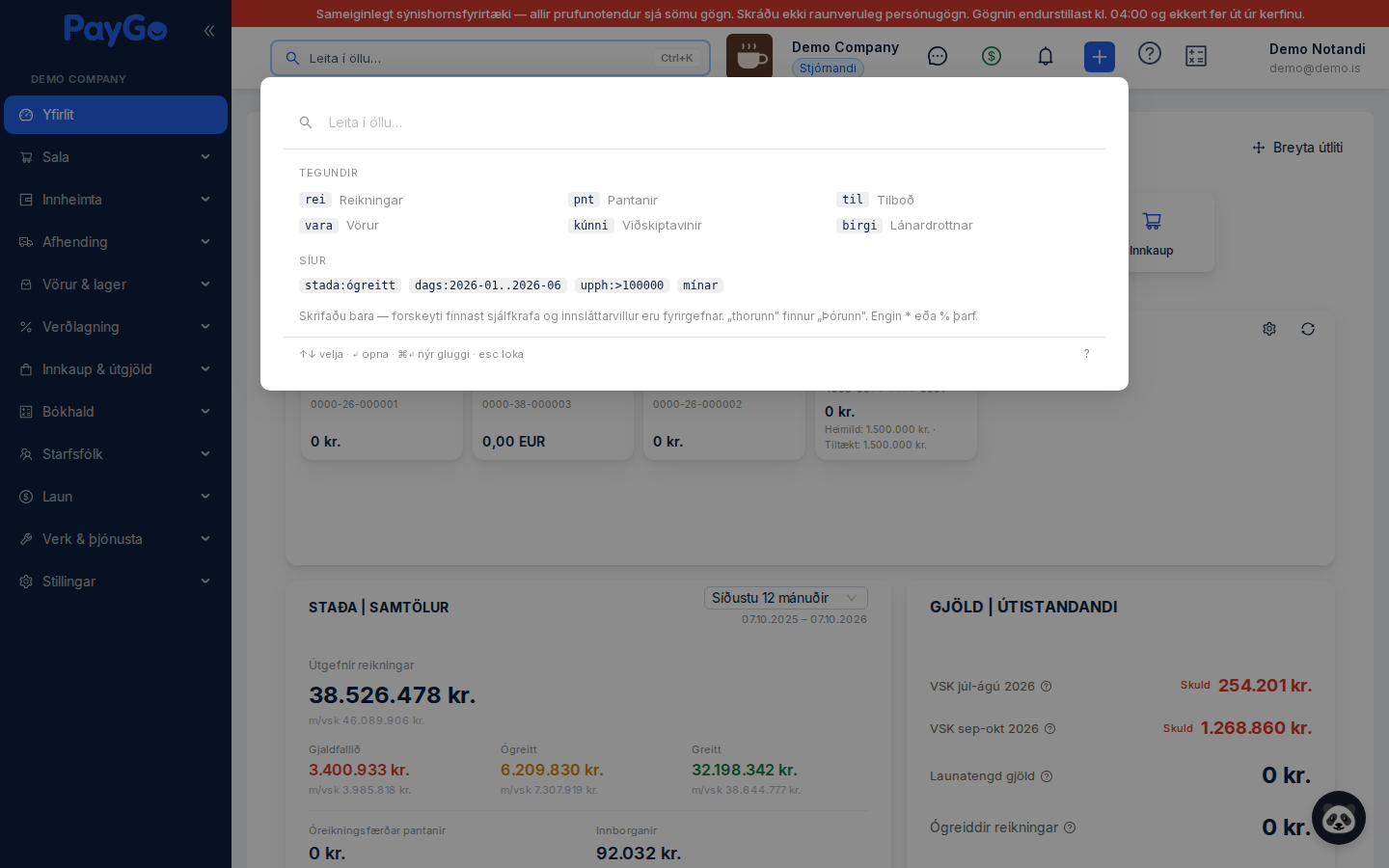
Global search is the search field at the top of the dashboard. You open it by clicking it or pressing ⌘K (Ctrl+K on Windows and Linux) anywhere in PayGo. It searches across six types at once and returns the results grouped by type, with a count next to each group. You do not need to know where the record is stored — just type what you remember.
| Type | Searches in |
|---|---|
| Invoices | Invoice number, customer name, kennitala (national ID), reference |
| Orders | Order number, customer name, kennitala, reference |
| Quotes | Quote number, customer name, kennitala, reference |
| Products | Name, product number (SKU), description, web name |
| Customers | Name, kennitala, email, phone, town |
| Suppliers | Name, kennitala, contact person, email, phone, town |
Search in a single type
Type a type keyword at the start of the field followed by a space. The word turns into a blue chip and the search is narrowed to that type. You can also click the words in the list that appears when the field is empty.
| Type | Words that work |
|---|---|
| Invoices | rei, reikn, inv |
| Orders | pnt, pöntun, pontun, ord |
| Quotes | til, tilb, quo |
| Products | vara, prd, sku |
| Customers | kúnni, kunni, cust |
| Suppliers | birgi, sup |
Narrow down with filters
Filters are written with a colon so that they never clash with ordinary words. They can be combined — rei stada:ógreitt upph:>100000 finds unpaid invoices over 100.000 kr.
| Filter | Format | Example |
|---|---|---|
| Status | stada:<word> | stada:ógreitt |
| Date range | dags:<from>..<to> | dags:2026-01..2026-06 |
| On or after | dags:><date> | dags:>2026-01-01 |
| Single month | dags:<year-month> | dags:2026-05 |
| Minimum amount | upph:><number> | upph:>100000 |
| Amount range | upph:<from>..<to> | upph:10000..50000 |
| My records | mínar, minar, mín, min, mine | mínar |
Status words
Status words work across types. The same word can mean different things depending on the type — “niðurfellt” is one status on an order and another on a quote — and the search takes care of finding the right codes in each case. If you type a word that is not on the list, it does not become a filter but stays as ordinary search text. That way you cannot accidentally filter out all results.
| Status | With Icelandic characters | Without Icelandic characters |
|---|---|---|
| Unpaid | ógreitt | ogreitt |
| Paid | greitt | greitt |
| Partial | að-hluta | ad-hluta |
| Draft | drög | drog |
| Sent | sent | sent |
| In progress | í-vinnslu | i-vinnslu |
| Cancelled | niðurfellt | nidurfellt |
| Overdue | tímabært | timabaert |
| Approved | samþykkt | samthykkt |
| Rejected | hafnað | hafnad |
| Expired | útrunnið | utrunnid |
| Pending | bíður | bidur |
| Confirmed | staðfest | stadfest |
| Delivered | afhent | afhent |
| In transit | í-flutningi | i-flutningi |
| Invoiced | reikningsfært | reikningsfaert |
| Active | virkt | virkt |
| Inactive | óvirkt | ovirkt |
How the search finds what you type
The search uses four methods. Exact matches and prefixes rank first, word search finds the rest, and typos are only looked up when nothing else is found. You do not need to do anything special — it switches method by itself when needed.
| Method | What it does | Example |
|---|---|---|
| Exact match | A document number or name that matches exactly goes to the top | SR-2026-0412 |
| Prefix | The beginning of a number or name is enough — you do not need to finish it | SR-2026 finds all invoices for the year (the prefix depends on your settings) |
| Word search | Every word in a name, kennitala or reference is searchable | bergur finds “Bergur ehf.” and all of its documents |
| Typos | If nothing is found, it searches for the closest match | bergru still finds “Bergur” |
Where does the record open?
Invoices, orders and quotes open on their own page. Products and suppliers open in a panel on the relevant list. Customers open on the sales board with the customer selected — there you see their balance, invoices, quotes and orders and can sell to them straight away. To edit the master data, go to Sales → Customers.
Keyboard navigation
| Key | Action |
|---|---|
| ⌘K / Ctrl+K | Open the search anywhere in the dashboard |
| ↑ ↓ | Move the selection, across all groups |
| ↵ | Open the selected record |
| ⌘↵ / Ctrl+↵ | Open in a new tab — the search stays open so you can open more in a row |
| Esc | Clears the search text first, then the filters, and finally closes the window |
| Backspace | In an empty field: removes the last filter |